
How to view your paperless billing statements
To see your paperless billing statements, log in to your account on the MyChart website then go to Menu > Billing Summary > View last statement.
On the Ohio State MyHealth mobile app, statements will be found under the Billing tile. If you need a paper copy of your statement, you can print directly from MyChart.
Don’t forget: You can pay your bill online.
How to opt out of paperless billing
You can opt out of paperless billing at any time. If you are enrolled in paperless billing and wish to opt out, follow these steps:
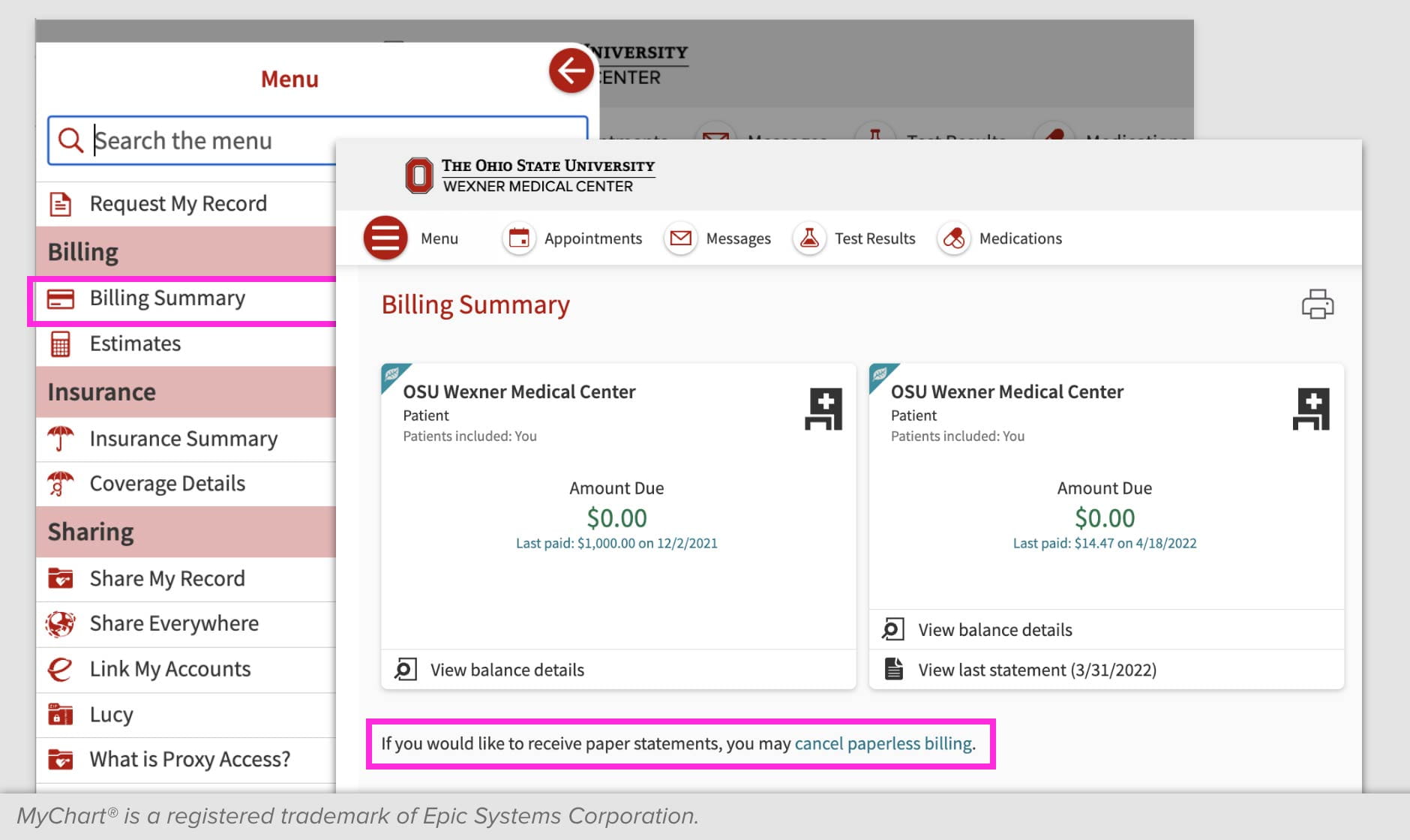
- On the homepage of your MyChart account, click the menu and select Billing Summary.
- Under your billing summary you'll see a statement that reads "If you would like to receive paper statements, you may cancel paperless billing." Click on the words "cancel paperless billing."
- On the next screen, click the button "Receive paper statements."
-
We understand that some patients with MyChart accounts prefer to receive a paper statement — and that’s OK!
Receiving paper statements is easy. You’ll need to opt out of paperless billing statements, which can be done via your MyChart account on the MyChart website. Find out how to opt out of paperless billing.
Patients can opt in and opt out of receiving paper statements as often as they would like.
-
When a new statement is ready to review, you’ll receive a notification to the email address on file in your MyChart account. You may also receive a text message notification.
-
At 60 days past due, the Ohio State Wexner Medical Center has procedures in place to actively reach out via mail for accounts with outstanding balances. You’ll receive a courtesy paper bill statement reminding you that you’re signed up for paperless billing.
Log in to your MyChart account to ensure your email address is correct. -
Yes, there are two ways to opt out of receiving paperless statements: through the Ohio State MyHealth app or the MyChart website.
Find out how to opt out of paperless billing and return to paper billing.
-
No, if your auto-payment plan remains current, you aren’t required to view your statement each month. However, if a new balance becomes due that isn’t on your payment plan, we’ll send you a courtesy paper statement if you haven’t viewed your billing statement in MyChart.
As a reminder, you can self-service your payment plan to add new balances or change payment terms from within your MyChart account. -
Yes, our customer service team can assist you with any questions related to paperless billing or opting out.
Call 1-800-678-8037 or 614-293-2100, or send a billing message to our customer service team from your MyChart account.
-
Billing statements are generated on a monthly cycle and are only current as of the date of the statement. Balances displayed in MyChart, however, are updated in real time and will show any current unpaid balance.
Questions or need assistance?
If you have any questions related to paperless billing or need assistance, you can send a MyChart message or call our Customer Service team at 1-800-678-8037 or 614-293-2100.
Do you have the Ohio State MyHealth app?
Download the MyHealth app and sign up for MyChart today and get care from our experts when you need it, from wherever you are.